

Introduction
Learning music can feel… confusing sometimes.
You practice, you repeat, you try again — but you’re not always sure if you’re improving. And honestly, that’s frustrating. A lot of people quit because of that exact reason.
This is where smartmusic software comes in.
It doesn’t magically turn you into a pro overnight (nothing does), but it gives you something most learners struggle with — clear feedback. And that changes everything.
In this article, we’ll go through what smartmusic software is, how it works, and whether it’s actually worth your time.
What is SmartMusic Software?
Let’s not overcomplicate it.
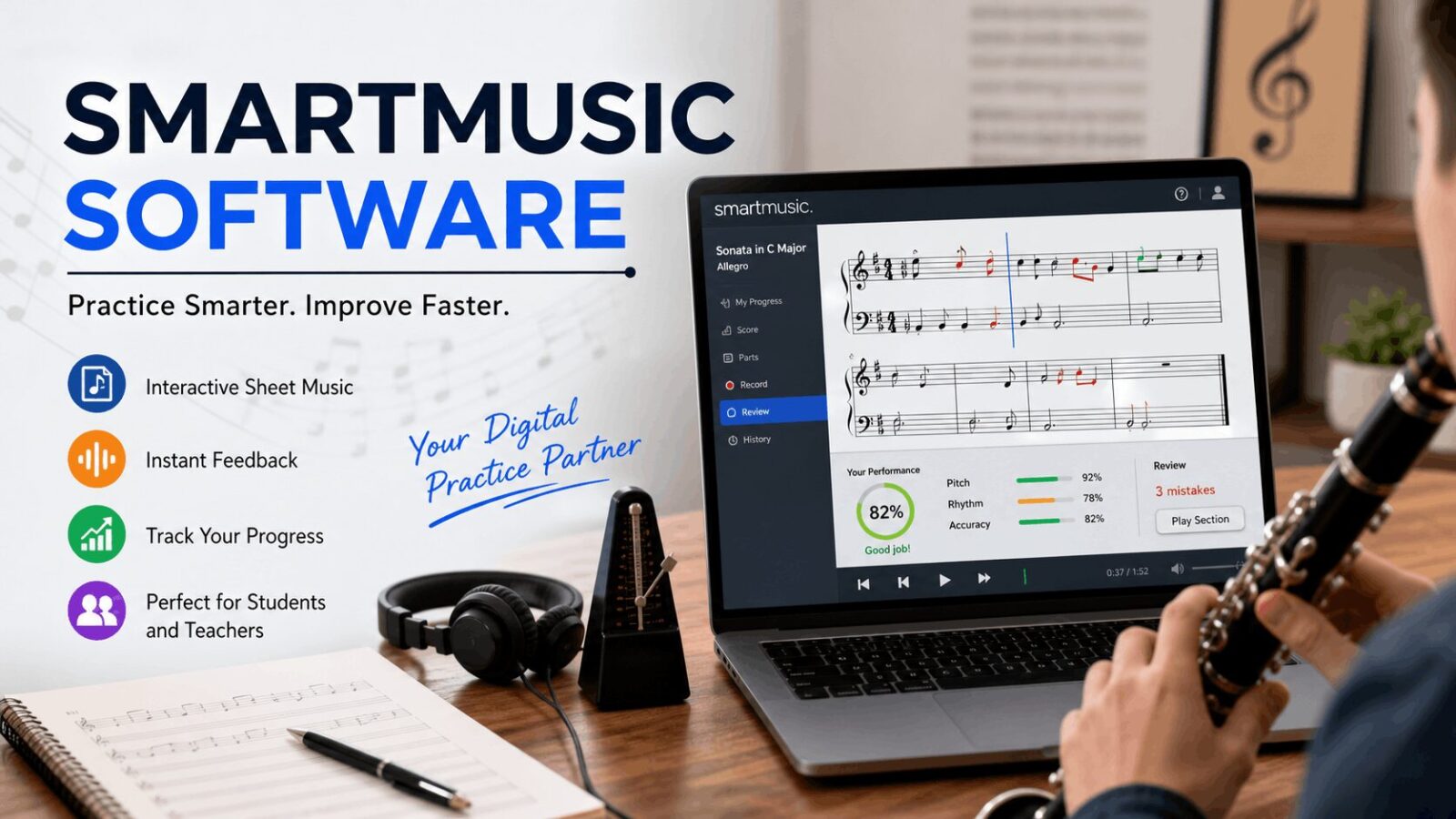
SmartMusic software is an online tool that helps you practice music with real-time feedback. You play or sing, and it listens. Then it tells you what you did right… and what needs fixing.
Kind of like a digital practice partner.
What it basically does:
- Shows digital sheet music
- Listens to your performance
- Highlights mistakes instantly
- Tracks your progress
Simple idea. Powerful when used properly.
How SmartMusic Works (In Real Life)
Okay, so here’s what actually happens when you use it.
You pick a piece of music. Could be easy, could be hard — your choice. Then you play along while the software listens through your microphone.
After that, it gives feedback.
Usually, it checks:
- Pitch (are you hitting the right notes?)
- Rhythm (are you on time?)
- Accuracy (did you miss anything?)
Sometimes it feels a bit strict. Like, too strict. But that’s kind of helpful in the long run.
Key Features of SmartMusic Software
There are quite a few features, but let’s go through the ones that actually matter.
1. Interactive Sheet Music
No more flipping pages or losing your place.
- Everything is on screen
- You can zoom in
- You can slow things down
- You can play along
It feels modern… and honestly more convenient.
2. Instant Feedback
This is the main selling point.
As you play, the software shows mistakes using visual indicators. Usually red notes or markings.
It’s not perfect, but it’s fast. And fast feedback helps you fix things quickly.
3. Built-In Music Library
You get access to a decent collection of music.
Includes:
- Classical pieces
- Jazz exercises
- Band arrangements
- Beginner to advanced levels
So yeah, there’s enough variety to keep things interesting.
4. Practice Tools That Actually Help
This part is underrated.
You can:
- Loop a difficult section
- Slow it down
- Practice only a few bars
And if you’ve ever struggled with one small part of a song… you know how useful this is.
5. Progress Tracking
You can see how you’re doing over time.
- Scores are saved
- Performances are recorded
- Weak areas become obvious
It’s not just about practicing — it’s about improving with direction.
6. Teacher Dashboard
For teachers, this is a big deal.
- Assign practice work
- Monitor student progress
- Give feedback remotely
It saves time and reduces manual effort.
Benefits of Using SmartMusic Software
Let’s be honest — why would someone use this instead of normal practice?
For Students
- You don’t feel lost
- You know exactly what to fix
- Practice feels more interactive
For Teachers
- Less time checking assignments
- Easy student tracking
- Better organization
For Self-Learners
This is probably where SmartMusic shines the most.
- You stay on track
- You get guidance without a teacher
- You build confidence over time
Step-by-Step: How to Use SmartMusic Software
If you’re starting fresh, here’s a simple way to begin.
1: Create an Account
Sign up and choose your role:
- Student
- Teacher
- Individual
Nothing complicated here.
2: Select Your Instrument
Options include:
- Piano
- Guitar
- Violin
- Voice
- Wind instruments
Pick what you play.
3: Find a Song
Browse the library and choose something suitable.
Quick tip: Don’t go for the hardest piece right away.
4: Start Practicing
- Play along with the music
- Adjust tempo if needed
- Repeat sections
This part might feel slow at first. That’s okay.
5: Record Your Performance
Click record and play.
Yes, it can feel awkward hearing yourself. Everyone goes through that.
6: Review Feedback
Check:
- Mistakes
- Timing issues
- Missed notes
7: Improve and Repeat
Fix the problem areas and try again.
It’s repetitive. But honestly, that’s how improvement works.
SmartMusic vs Traditional Practice
Let’s compare quickly.
| Feature | SmartMusic Software | Traditional Practice |
|---|---|---|
| Feedback | Instant | Delayed |
| Structure | Guided | Self-managed |
| Tracking | Automatic | Manual |
| Engagement | Higher | Sometimes boring |
Traditional practice still matters, no doubt. But SmartMusic makes it more efficient.
Who Should Use SmartMusic?
Not everyone needs it… but many people can benefit.
Beginners
- Learn basics faster
- Build confidence
Intermediate Players
- Improve accuracy
- Fix recurring mistakes
Advanced Musicians
- Polish performances
- Prepare for exams
Teachers
- Manage multiple students
- Save time
Tips to Get Better Results
This part matters more than the tool itself.
- Practice regularly (even 15–20 minutes daily)
- Don’t rush difficult parts
- Use slow tempo first
- Focus on weak areas
- Record yourself often
Also… be patient. Improvement takes time.
Common Problems (And Honest Fixes)
Problem 1: Sound Detection Isn’t Accurate
Yeah, this happens.
Fix:
- Use a better microphone
- Reduce background noise
- Sit closer to the device
Problem 2: It Feels Too Strict
Sometimes it marks things wrong even when they sound okay.
Fix:
- Don’t chase perfection
- Focus on progress
Problem 3: Practice Gets Boring
Happens to everyone.
Fix:
- Try new songs
- Set small goals
- Take breaks
Pricing Overview
SmartMusic works on a subscription model.
| Plan | Best For | Features |
|---|---|---|
| Student | Learners | Basic tools |
| Teacher | Educators | Assignments + tracking |
| Individual | Musicians | Full access |
Prices change sometimes, so check the official website for updates.
Pros and Cons
Let’s keep it real.
Pros
- Easy to use
- Instant feedback
- Good for self-learning
- Helps teachers manage students
Cons
- Requires internet
- Not free
- Feedback isn’t always perfect
Is SmartMusic Software Worth It?
Honestly… yes, for most people.
If you’re serious about improving, it gives you structure and direction. That alone can save months of confusion.
But if you’re not consistent, it won’t help much. No tool can fix that.
FAQs
1. Is SmartMusic beginner-friendly?
Yes, it’s actually great for beginners.
2. Can it replace a music teacher?
No. It helps, but human guidance is still important.
3. Does it work offline?
Mostly no. You need internet access.
4. What instruments does it support?
Many, including piano, guitar, voice, and more.
5. How fast will I improve?
Depends on your practice. But consistent users usually see results within weeks.
Conclusion
So… here’s the honest truth.
Smartmusic software is not perfect. It won’t magically make you amazing. But it does something very important — it shows you where you’re going wrong.
And once you know that, improvement becomes much easier.
If you practice regularly and actually use the feedback, you’ll get better. Slowly, maybe. But surely.
And in music, that’s really what matters.